100% local AI · Total privacy

The AI that works on your computer.
Your data never leaves it.

LocalMind is an AI assistant for Chrome that summarizes, translates, writes and analyzes documents using Gemini Nano, the AI model built into your browser. No servers, no accounts and nothing sent to the cloud.

0.0All the taste of AI, none of your data leaving your device.

0.0servers
of our own
0.0data sent
to the internet
0.0accounts or
sign-ups
0.0trackers or
telemetry
Processed on this deviceGemini Nano · local
0 bytes to the cloudNo network requests
AES-256 encryptionPassword-protected spaces
LocalMind
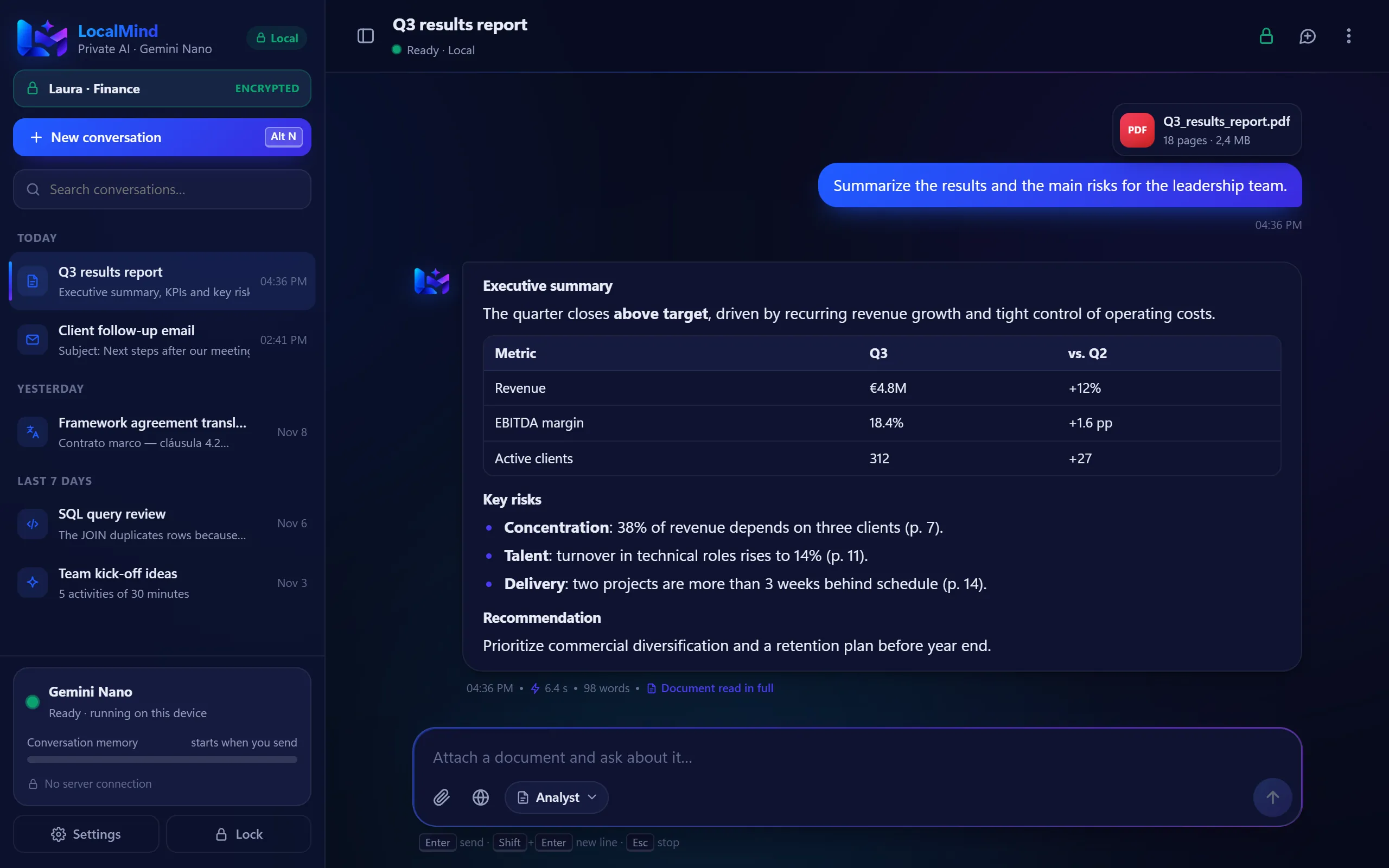
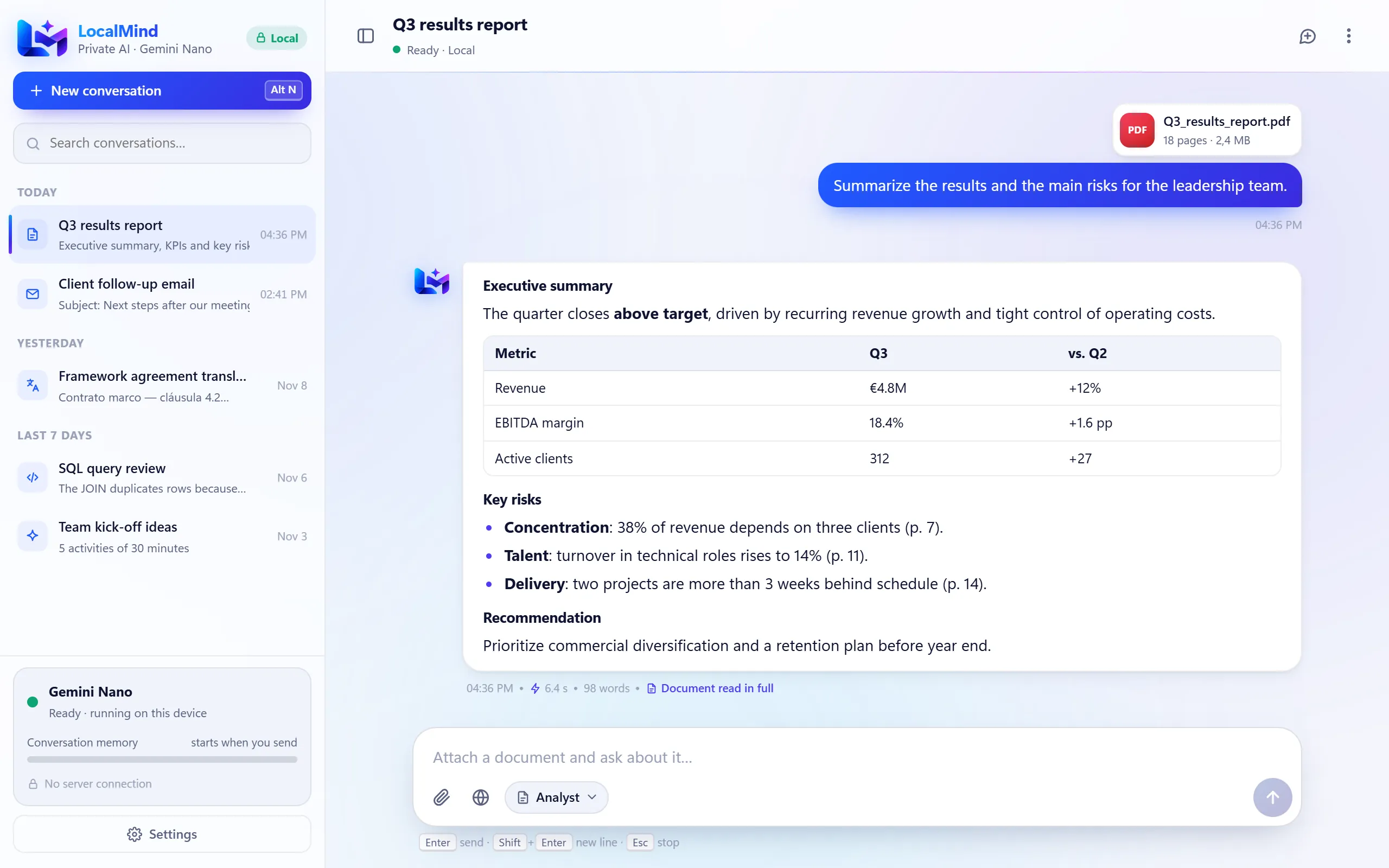
LocalMind analyzing a PDF report: executive summary, KPI table and risks, processed on the device.
Your text→your device→your answer.

No middlemen. No copies on someone else's servers. No "we use your data to improve our models".

How it works

Everything happens inside your computer

Chrome ships with its own AI model, Gemini Nano. LocalMind uses it directly, so your questions never travel to a server.

Your device
Step 1

You type or share

A question, a PDF, a spreadsheet or the page you are reading.

Step 2

LocalMind prepares it

It extracts the text in your browser. Long documents are read in parts.

Step 3

Gemini Nano answers

Chrome's model generates the answer on your own hardware.

Your data stays here, stored only in your browser
Blocked

The internet and the cloud

LocalMind does not send your conversations, documents or pages to any server. Not ours, not anyone else's.

The difference

Cloud AI vs. local AI

What changes when artificial intelligence lives on your device.

QuestionCloud AI assistantsLocalMind
Where is your data processed? On external servers On your device
Where are your conversations stored? In the provider's account In your browser, encrypted if you want
Do you need an account? Usually, yes No
Can your data be used to train models? Depends on the provider No: it never leaves your device
Does it work offline? No Yes, once the model is downloaded
How much does it cost? Subscription or pay-per-use Free
What it does

Everything you need, without leaving your device

Real screenshots of LocalMind.

Floating widget

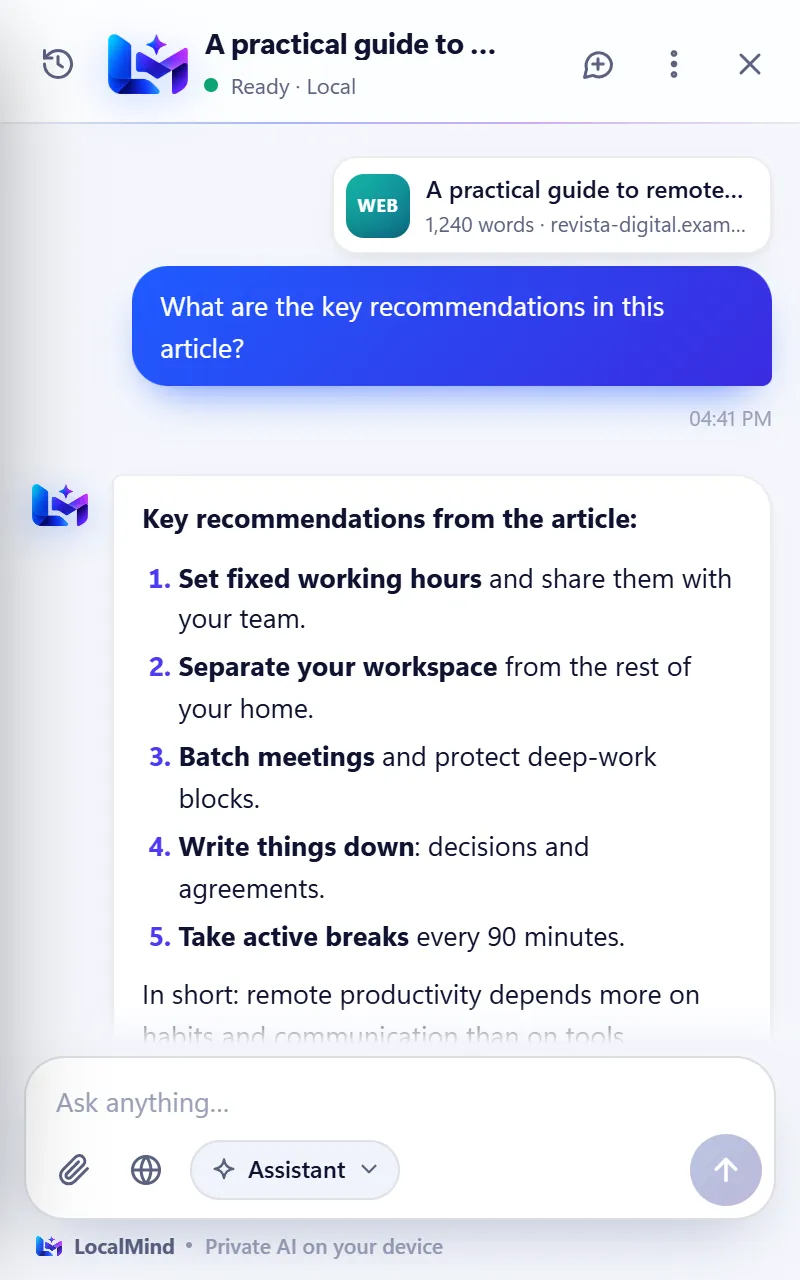
Ask about the page you are reading

Turn on the LocalMind button and open it on any website. It reads the article (or just your selection) and answers without you leaving the page.

  • Instant summaries and answers
  • Turn it on or off in Settings
  • The page is processed on your device
Local
revista-digital.example/remote-work
Documents

Analyze your documents without uploading them anywhere

Drop in a PDF, Word, Excel or PowerPoint file. LocalMind reads it in your browser and gives you the summary, the key figures and the risks.

  • PDF, Word, Excel, PowerPoint, text and code
  • Long documents read in parts
  • Ideal for confidential information
No uploads
LocalMind
LocalMind in dark mode showing the analysis of a PDF report inside an encrypted space.
6 work modes

A specialist for every task

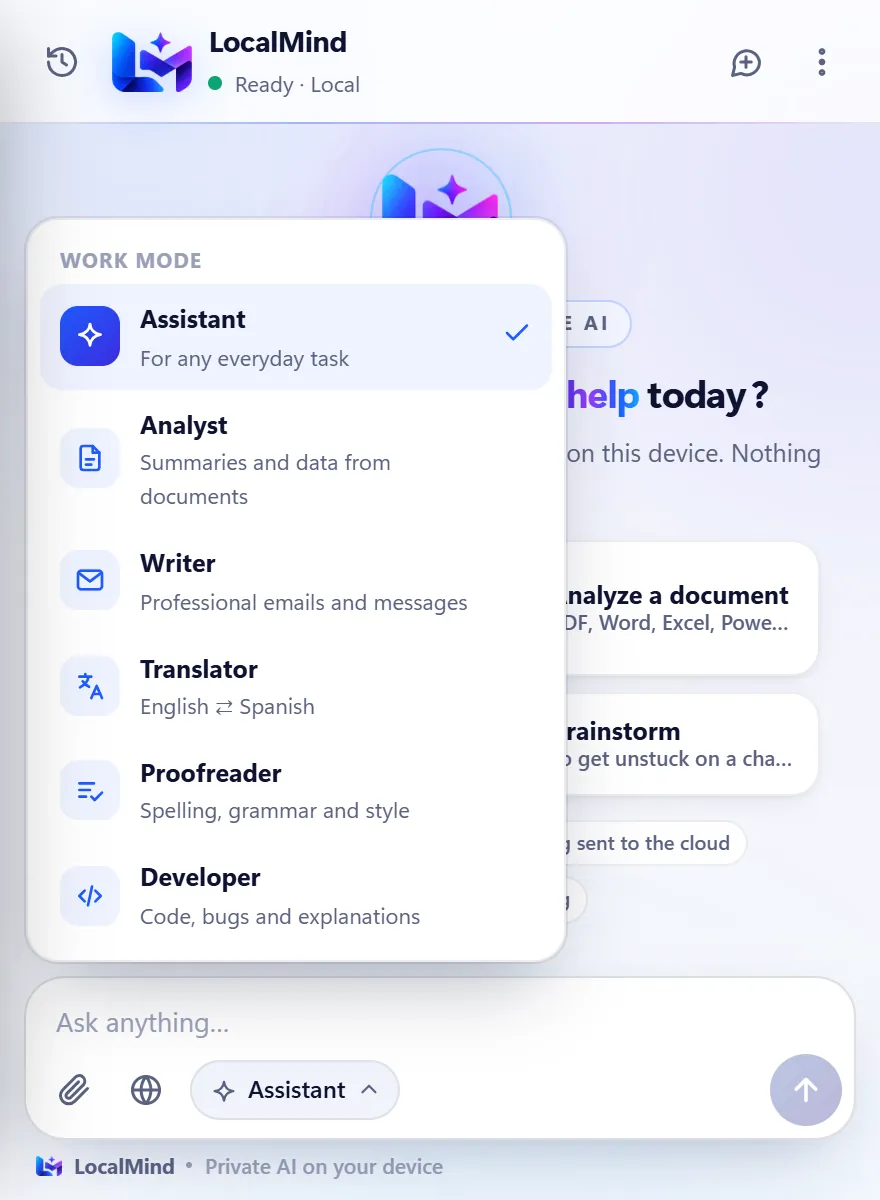
Assistant, Analyst, Writer, Translator, Proofreader and Developer. Pick a mode and LocalMind adapts its answers.

  • Professional emails and English ⇄ Spanish translations
  • Right-click menu, keyboard shortcuts and address bar
  • In the popup, the side panel or a full tab
Security

An encrypted space for each person

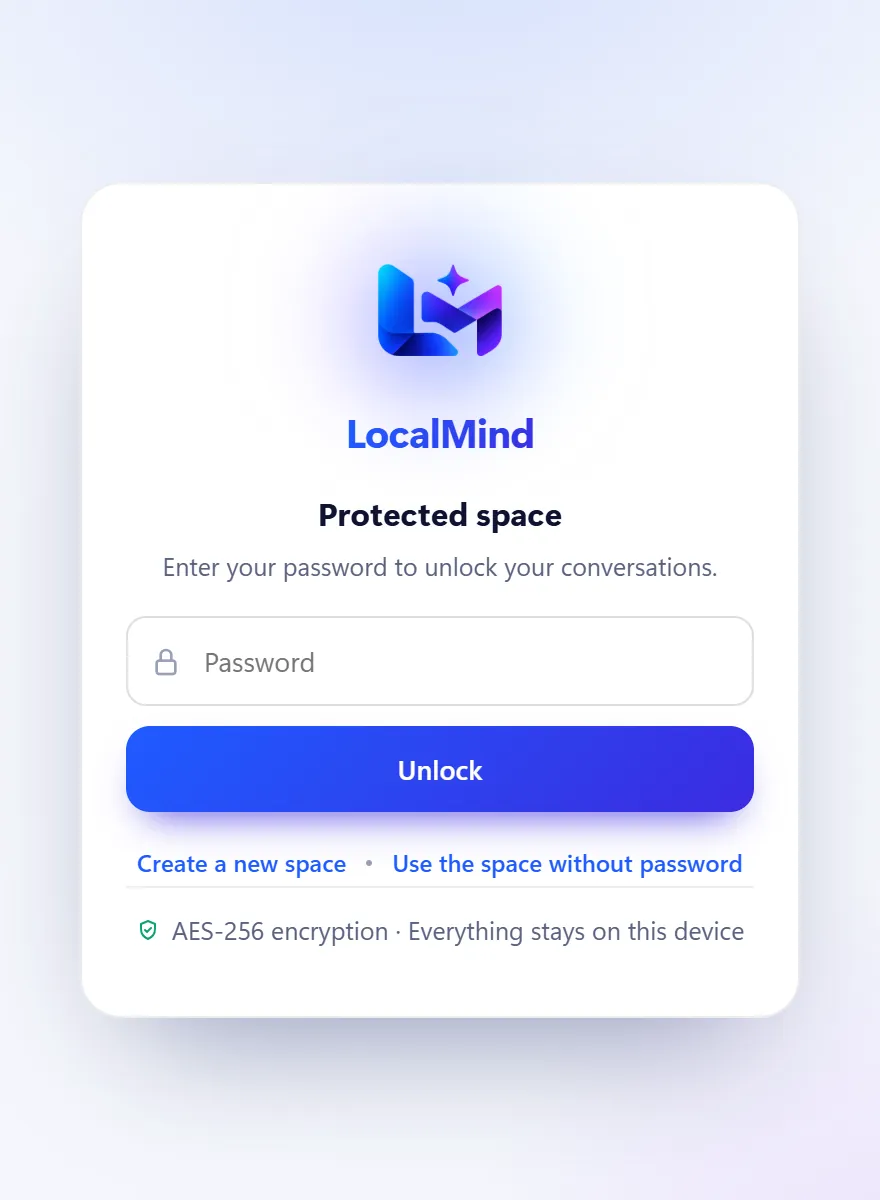
Sharing a computer? Each user creates their own password-protected space. Their conversations are encrypted on the device and only open with their password.

  • AES-256-GCM encryption on the device
  • The password is never stored anywhere
  • One-click lock
Lock screen of a protected LocalMind space.
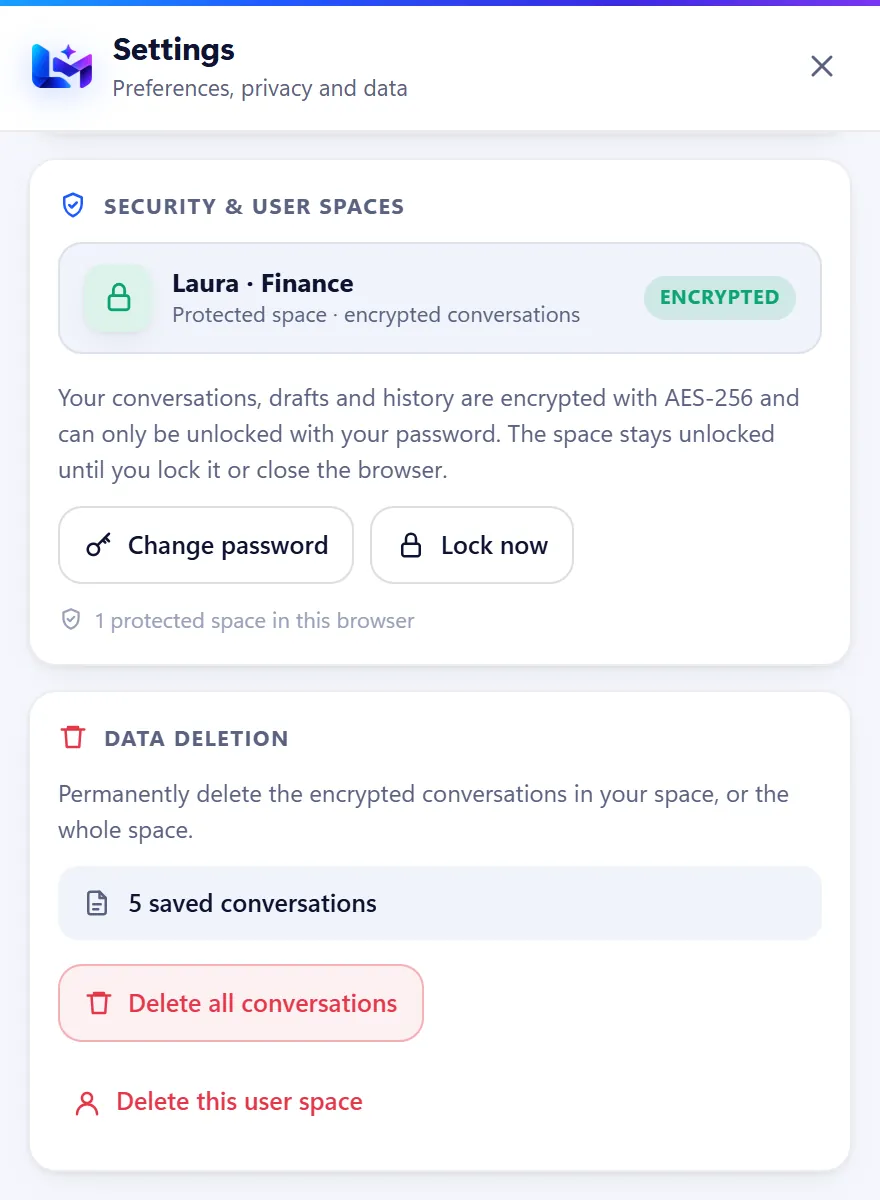
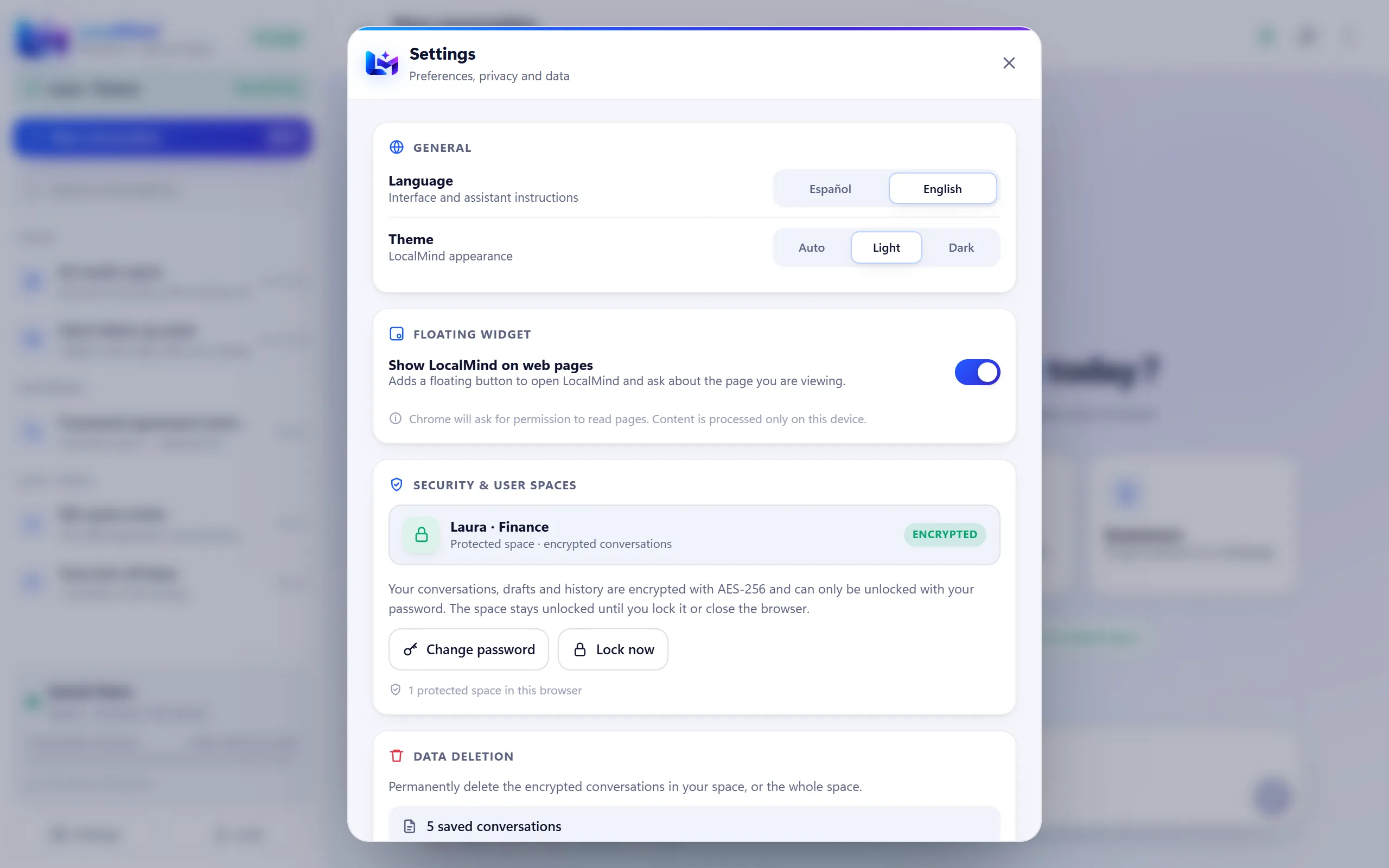
Security settings: encrypted space and data deletion.
Full control

Your data, your rules

Choose the language, turn the widget on or off and delete all your conversations in one click. If you uninstall LocalMind, its data goes with it.

  • Instant data deletion
  • Interface in English and Spanish
  • Light or dark theme
LocalMind · Settings
LocalMind settings: language, theme, floating widget, security and data deletion.

100% private. No fine print.

This is not a marketing promise: LocalMind is built so that your data cannot leave your device.

On-device AI

Gemini Nano runs inside Chrome, on your own hardware. Nobody else sees your questions.

No network requests

LocalMind does not connect to any server. The only download is the model, which Chrome fetches the first time.

No accounts

No sign-up, no login, no email. Install it and start.

No tracking

No analytics, no telemetry and no ads. We don't know what you do, and we don't want to.

AES-256 encryption

Password-protected spaces. The key is derived with PBKDF2 and the password is never stored.

One-click deletion

Settings → Data deletion. And if you uninstall the extension, everything goes with it.

Don't trust us: check it yourself

  1. Turn off your Wi-Fi after the model's first download: LocalMind keeps answering.
  2. Open LocalMind, right-click → Inspect → Network tab: you won't see a single request to any server.
Requirements

Will it work on my computer?

Since the AI runs locally, your computer needs some power. These are Chrome's requirements for Gemini Nano.

Chrome 138 or later

Windows 10/11, macOS 13+, Linux or ChromeOS (Chromebook Plus).

22 GB free to download it

Chrome asks for this space on your profile's drive to fetch the model, which then takes up much less.

Capable GPU or CPU

A GPU with more than 4 GB of VRAM, or 16 GB of RAM and 4 cores.

A single download

You only need internet for Chrome to download the model the first time.

1Add LocalMindfrom the Chrome Web Store.
2Pin the iconto the Chrome toolbar.
3Ask your first questionChrome downloads the model and you're set.
Add to Chrome

Frequently asked questions

Is nothing really sent to the internet?

Really. LocalMind has no servers and makes no network requests: text, documents and pages are processed with Gemini Nano inside Chrome, on your device. The only thing downloaded is the model itself, and Chrome downloads it the first time.

What is Gemini Nano?

It is the AI model Google builds into Chrome so it can run directly on the device. LocalMind uses it through the browser's Prompt API.

Do I need an account?

No. Not for LocalMind or any other service. Install the extension and start using it.

Where are my conversations stored?

In your browser's local storage. If you create a password-protected space, they are stored encrypted with AES-256. You can delete them whenever you want from Settings → Data deletion.

What if I forget my space's password?

It cannot be recovered, precisely because it is never stored anywhere. The conversations in that space stay encrypted for good.

How much space does the model take up?

Much less than 22 GB. Chrome asks for 22 GB of free space on your profile's drive so it can download it, but the model itself is considerably smaller and its exact size changes with updates; you can check it at chrome://on-device-internals. If free space later drops below 10 GB, Chrome removes the model and downloads it again once there is room.

Does it work offline?

Yes. Once Chrome has downloaded the model, LocalMind works without internet.

How much does it cost?

Nothing. LocalMind is free and has no paid plans.

Which languages does it support?

The interface is available in English and Spanish, and you can switch in Settings. Translator mode translates between the two.

Your AI. Your device. Your data.

Start using artificial intelligence without giving up your privacy.

Add to Chrome · Free